Posts

Showing posts from July, 2026

The Power of Multi-Layer AEM Models with AnAqSim

Image
Unlike simpler AEM models, which generally only allow for one model layer, AnAqSim can incorporate up to 10 model layers. Each layer can have its own aquifer properties, its own hydraulic features (wells, line sources and sinks, recharge or leakage areas, etc.), and its own boundary conditions.  This allows users to create vertically-zoned aquifers, or vertical aquifer-aquitard sequences that can more accurately represent geology within the aquifer domain and can simulate three-dimensional groundwater flow conditions, such as vertical discharge to surface water bodies or flow to partially penetrating features. Similar in some ways to the new MODFLOW-USG software, AnAqSim allows for flexible layering in a model – allowing more layers to be added in an area of interest, and fewer layers in the far field area, as shown below. With this additional power and flexibility come some additional requirements for model construction and testing to ensure an accurate solution. The A...
Introduction to TS-CHEM Chart Controls

Image
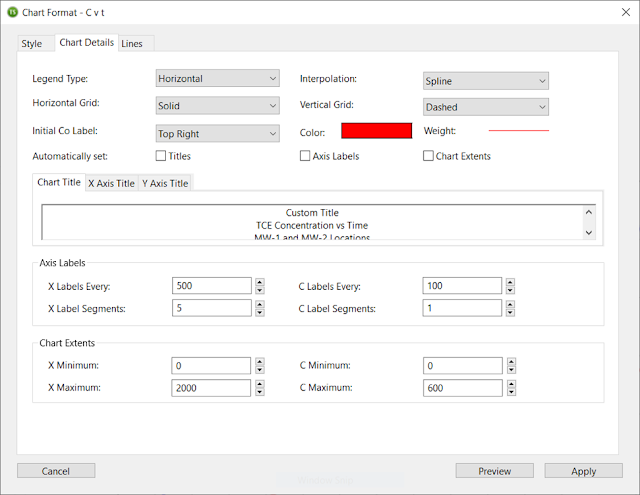
  TS-CHEM has some great new features, including new options for BIOSCREEN-AT, Dark Mode (Mac version) and the ability to double-click project files to open them. But some of the most powerful features center around the new chart controls. A brief overview of these new chart controls is included below. CHART AXIS CONTROLS All three of the major chart types (C v t, Profile, and Contour) display axes; and so does the digitized concentration chart in the Concentration Inspector tool. In TS-CHEM v2022-3, the user can now control almost every aspect of the of these chart axes including: Major tick and label placement Minor tick spacing Chart grid lines Custom axis title Axis extent Figure 1 - TS-CHEM Chart Axis Controls These controls allow for the creation of better-looking data plots. Figure 2 - TS-CHEM Concentration vs. Time Data Plot And, in the case of the axis extent controls, they allow the user to zoom in on a portion of the chart to better examine data concentrations or trends....

TS-CHEM - The Swiss-Army Knife of Solute Transport Modeling

Image
Understanding Plume Movement at a Site Environmental professionals are often tasked with investigating contaminated sites to understand the nature and extent of contamination in groundwater, and select an appropriate remedy that will effectively limit migration of impacted groundwater, treat it, and prevent groundwater plumes from reaching sensitive receptors.  To do this, a sound conceptual site model (CSM) is necessary, which requires not only collection of adequate site data (including groundwater sampling data, water level elevation data, and information on site hydrogeologic conditions) and application of professional judgement, but also the use of data analysis tools and techniques that allow for a better understanding of the fate and transport of contaminants in groundwater. Plume Modeling Tools Although there are a number of analytical solute transport modeling tools that are freely available (such as the Pennsylvania Department of Environmental Protection’s Quick Domenico ...

flexAEM Overview

Image
The flex AEM system is designed to help new and advanced environmental professionals and groundwater modelers enhance their modeling experience. We have compiled our extensive experience with AEM modeling into custom tools and easy-to-follow tutorials that can help you learn some basics about groundwater modeling, get you started on a new way to model and new software, or investigate how AEM works with complex hydrological systems. We have found that the techniques and information we are sharing can help make your groundwater models easier to build, faster to run, produce comparable results with other methods, and provide you with greater flexibility in meeting the unique modeling needs for your project or hydrologic system. Be sure to visit us here to get the latest updates on new flex AEM tutorials and training, discuss new developments in the world of AEM modeling, or post questions in the "Post a Comment" section regarding any of our flex AEM training materials! Visit...

A Quick Start to Exploring TS-CHEM

Image
  Quick Start Guide to TS-CHEM Within minutes, you can run your own solute transport models using TS-CHEM! To start using and discovering what TS-CHEM can do, follow these simple instructions: 1. Navigate to  the TS-CHEM website purchase page and click on the blue "Try TS-CHEM Demo" button. 2. Select your operating system and click "Checkout." (There is no charge for the demo, and no credit card information is required.) After entering some basic information, you will receive an email with a link to download TS-CHEM, a quick start guide, and a more detailed user manual. 3. Once you download and install the software, launch TS-CHEM to enter the demo version of the software.  4. Download and open the Quick Start Guide PDF, which will take you through the process of  creating a single source model as well as a 2-source model that generates a commingled contaminant plume. 5. By the end of the Quick Start Guide (which should take about 10 minutes), you will be able to p...

TS-CHEM Overview

Image
   TS-CHEM Overview - Features and Applications TS-CHEM is a software studio for solute transport modeling within which the user can: Select from one of 32 widely used ADE models now assembled in a single library Specify a chemical for each Source Model (from the internal chemical database or as a user-specified custom chemical) Add one or more source models, at selected locations; commingled plumes can be deconstructed to examine the contribution from each source Analyze plume volume, mass and other attributes Export plume data for plotting in other software For brief introductions to the main TS-CHEM features, view these videos . And check out these TS-CHEM example applications .